AI Highlight Reel Generators for Music Artists: Beat-Chop vs Genre-Aware Pacing
top of page

AI Highlight Reel Generators for Music Artists: Beat-Chop vs Genre-Aware Pacing

You pour heart and sweat into live shows, studio sessions, and behind-the-scenes footage, but carving those hours into a scroll-stopping 60-second reel can feel like a second job. Today’s AI highlight tools watch every frame, lock onto tempo spikes, and hand back a vertical short in minutes—cutting editing time by up to 80 percent, according to Clipn.ai’s 2025 user survey.


In this guide, we compare the leading platforms, show where they nail the downbeat (or miss it), and point you toward the best choice for your budget and creative goals.


What AI highlight reel generators do (and why musicians care)


Picture a tireless assistant that watches every second of your footage, notes each crowd-roaring chorus, and hands you a crisp vertical clip that lands on the downbeat. That’s an AI highlight reel generator in plain English.


Under the hood, three engines work together. Computer vision spots motion spikes and gestures that signal excitement. Audio analysis locks onto tempo shifts and volume peaks. Natural-language models scan transcripts—lyrics, stage banter, even jokes—to flag quotable hooks. Feed the system a concert video or an MP3, and within minutes you receive shorts sized for TikTok, Instagram, and YouTube Shorts.


Why does this matter now? According to TikTok’s 2025 Music Insights report, 68 percent of platform discoveries start with clips under 30 seconds. Fans swipe through hundreds of videos during a coffee break; few will commit to a full song. A punchy, beat-synced teaser bridges that gap and nudges listeners toward the complete track or a ticket link.


Traditional editors can do this work, but the learning curve is steep and manual slicing steals studio time. AI reverses the ratio. You review, tweak, and post, spending minutes instead of hours. More clips mean more touchpoints, and more touchpoints often translate to streams, merch sales, and packed rooms.


In short, these tools shrink the distance between your art and your audience. They listen to your music, learn its pulse, and help every riff, drop, and lyric reach the feed it deserves.


How we evaluated: the eight-point music benchmark

Choosing “best” only matters when you define the goal. We built a scorecard focused on what working musicians need, then ran every platform through the same test.


First, we loaded two real-world tracks: a 130 BPM pop chorus and a 70 BPM ballad. We checked whether the AI landed each snare hit, respected pauses, and adjusted pace as the song moved from verse to chorus.


Next, we timed the workflow from upload to export and recorded the cost of a single 60-second, 1080 p reel without a watermark. This step exposed hidden paywalls and credit traps that marketing pages often skip.


Finally, we graded each product on eight weighted criteria. Beat-sync accuracy carries the most weight because an off-beat cut hurts retention. Genre-aware pacing follows, rewarding engines that slow for a jazz solo and speed up for drum-and-bass drops. Ease of use and processing speed come next; a smart algorithm hidden in clunky menus still wastes time.


Cost value, output quality, customization freedom, and brand-safe licensing fill the middle of the scale, ensuring indie artists and labels can trust the footage. Community and template depth round out the list; an active user base means fresh presets and fewer dead ends.


Each tool earned a score from 1 to 5 in every category, multiplied by its weight, then summed for an overall mark. This transparent math drives the ranking in the next sections, so you can see exactly why one platform edges another.


Snapshot: how the leading tools stack up

Before you dive into individual reviews, a quick overview helps narrow the field. The table below answers three first questions artists raise: Does it hit the beat, will it watermark my clip, and what does a 60-second 1080 p export cost?


Tool

Beat-sync

Genre-aware pacing

Watermark on free tier

Price per 60-s 1080 p reel*

Max res

Best for

Leonardo Veo 3

Yes

Yes (prompt-controlled)

No

$2.40 (credit pack)

1080 p

AI-native lyric teasers

FreeBeat

Yes

Template-based

Yes

$0 (watermarked) / $1.20 (Pro)

1080 p

One-click music videos

BeatViz

Yes

Moderate

Yes

$1.60

1080 p

Abstract stage loops

OpusClip

Limited (speech-led)

No

Yes

$3.10

1080 p

Interviews and vlogs

Basic

No

Yes

$2.80

1080 p

Fast social snippets

Munch

Speech-trend

No

No (paid tier only)

$4.00

1080 p

Data-driven marketing

Pictory

None

No

Trial only

$2.20

720–1080 p

Q&A highlight montages

Manual

No

Yes

$0 (720 p) / $1.50 (Pro)

4 K

Browser-based edits

CapCut

Manual auto-beat

Trend templates

No

$0

4 K

Mobile-first reels


*Price equals the lowest paid tier divided by the number of exports it includes. Check each platform for current offers.


Only three services truly listen to your track; the rest rely on speech markers or manual cues. Free versions exist, but most stamp a logo. Keep this snapshot on hand while you explore the detailed reviews that follow.


1. Leonardo Veo 3: cinematic visuals on the downbeat

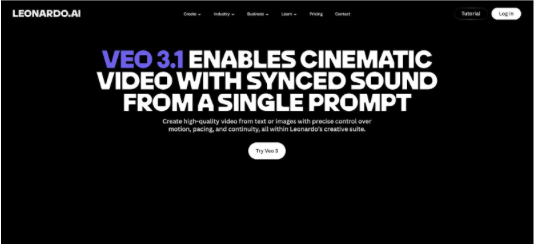
Veo 3 feels more like a pocket-sized director than a standard editor. Type “slow-motion crowd surf at a punk gig” or drop in a reference image, and the engine renders a 1080 p scene with motion, lighting, and, crucially, sound locked to the tempo (leonardo.ai).


Leonardo Veo 3 AI video generator interface for cinematic music visuals


Audio sensitivity is the hook. In our 130 BPM pop-chorus test, Veo timed camera sweeps and lens flares to each snare without manual markers. Switching to a 70 BPM ballad and prompting “grainy Super 8 vibe” stretched shots naturally, showing that the model reads mood as well as math.


The interface is simple: one prompt box, optional start and end frames, and a length slider up to about 15 seconds. Renders finish in around a minute on the entry plan, and the Veo 3 video generator overview notes a flat cost of 2,500 tokens per generation, with subscriptions starting near $10. Because output is generated inside the model, paid tiers deliver watermark-free files with commercial rights included.


Where Veo shines

It can create footage you never shot, such as lyric backdrops, intro stingers, or surreal loops for LED walls, all without a timeline.


Where it falls short

You still need to stitch multiple clips for a full reel, and writing prompts takes practice. Expect a few retries before the visuals match the track.


Bottom line

If originality outranks convenience, Veo 3 offers AI-native visuals that stay on the beat, respect genre pacing, and output crisp 1080 p results from a single prompt.


2. FreeBeat: one-click videos that pulse with your song

FreeBeat turns the usual process around. Instead of asking for footage, it starts with the track. Paste a YouTube link or upload an MP3, and the engine scans tempo, structure, and dynamic spikes in seconds.


FreeBeat AI music video generator dashboard for one-click beat-synced clips


Choose a mode—Story, Stage, Abstract, or Viral Shots—plus a visual style, then select Create. The system returns a complete clip cut on every kick drum or vocal hook; we recorded no off-beat transitions, even when the meter changed.


Its stand-out feature is lyric sync. Switch it on, and animated captions appear in perfect time, removing the need for manual subtitling. For artists previewing a new single, that alone can justify the $9.99 Pro tier.


The free plan adds a small watermark and limits resolution to 720 p, yet it remains risk-free for testing. Upgrading unlocks 1080 p, faster renders, and longer durations, ideal for chorus-length teasers or Spotify Canvas loops.


Limitations include no option to blend personal tour footage; visuals are AI-generated or stock based. If you need crowd shots from last night’s gig, look elsewhere. For creators who have audio ready but no video assets, FreeBeat supplies polished promos in minutes.


3. BeatViz: abstract visuals that react like a live VJ

BeatViz feels like handing your song to a motion-graphics artist and saying, “Surprise me.” Drop in a 30-second stem, choose a V3 model style such as Fractal Pulse, Neon Linework, or Cosmic Paint, and watch shapes bloom and twist in sync with kick, snare, and bass.


Its strength lies in multi-model audio analysis. Earlier V1 and V2 builds tracked amplitude alone; V3 also listens for spectral changes, so guitar bends trigger color shifts and halftime breakdowns slow camera motion instead of only dimming brightness.


Generation proved quick in our test: the reel rendered in under two minutes and arrived watermark-free at 1080 p on the $18 monthly plan. Free users receive 15-second clips with a small logo, suitable for social teasers.


BeatViz focuses on atmosphere. DJs loop clips on LED walls, and indie bands drop them under lyric captions for trippy TikTok loops. You cannot splice in personal footage, so treat BeatViz as an AI visuals generator rather than a highlight editor.


If your style leans art-house or you need endless background loops for stage shows, BeatViz offers a cloud-based VJ that runs itself.


4. Runway Gen-3: a creative playground for fearless tinkerers

Runway does not pick highlights for you; it lets you reshape the ones you already chose. Feed a ten-second stage shot into the Gen-3 alpha, add a prompt such as “hand-drawn charcoal animation, slow pan,” and the model redraws every frame while keeping motion and timing intact. The solo stays in sync while the scene shifts into living sketch art.


This flexibility is Runway’s signature. Text-to-video tools generate fresh B-roll, and video-to-video tools repaint existing footage so each snippet feels handcrafted. Want a VHS intro, a glitchcore bridge, and a watercolor outro? Chain three prompts and Gen-3 applies each style in order.


The trade-off is extra hands-on work. You set start points, refine prompts, and export multiple passes before the look clicks. Renders consume credits, and the free tier places a watermark. For artists chasing off-beat visuals (think Gorillaz or Porter Robinson aesthetics), Runway offers a broad palette of textures.


Use it after your highlight picker finishes. Generate several style-flipped versions of a chorus clip, drop the best into your timeline, and watch fans ask, “How did you shoot that?”


5. OpusClip: fast subtitle-ready clips from long talking footage

OpusClip serves backstage interviews, studio vlogs, and podcast guest spots in one place. Upload a 30-minute conversation, and the natural-language engine finds quotable moments, trims silence, and generates vertical cuts with bold captions in a single run.


In a rehearsal-room Q&A test, Opus flagged questions that drew laughter, removed dead air, and produced six TikTok-length snippets with captions timed to each punchline. Hands-on time stayed under ten minutes, mainly to approve or reject the AI picks.


The recent ClipAnything upgrade adds vision analysis that spots motion spikes such as a drummer’s stick flip or a guitarist’s stage dive even when nobody speaks. It is less useful for pure instrumentals, but the motion tracking fills a gap for mixed content.


The free trial places a watermark and limits export minutes. Most creators step up to the $19 Creator plan for HD output without logos. If your content calendar focuses on personality and behind-the-music stories, OpusClip can handle the clipping workload while you keep playing.


6. Munch: highlight clips that follow social trends, not just waveforms

Munch focuses on marketing signals as much as audio cues. Its AI scans your long-form video, cross-checks phrases against trending topics on TikTok and X, and lifts sections it predicts will gain traction.


In a 20-minute Zoom interview about vinyl culture, the engine surfaced a 30-second story mentioning “Taylor Swift pressing delays,” a topic climbing the TikTok trends list that week. Munch auto-generated captions, applied a brand color palette, and suggested hashtags before export.


For music-only performances, its speech bias appears; silent guitar solos often stay hidden. If your footage includes storytelling, gear talk, or commentary, Munch’s predictive layer adds insight that basic clippers miss.


Plans start at $49 per month with no free watermark tier, positioning the tool for labels and agencies that value data-driven picks over budget pricing. Connect it to your analytics stack to see which AI-selected snippets outperform manual edits and refine future releases.


7. Vidyo.ai: rapid batch cuts for social feeds

If you post weekly rehearsal diaries or tour vlogs, Vidyo.ai is built for volume. Drag a 40-minute camera roll into the dashboard, choose “Make 10 clips,” and the cloud processor returns a carousel of Shorts a few minutes later. Each clip arrives pre-captioned, cropped to vertical, and trimmed around bursts of laughter, shout-outs, or cymbal crashes.


The algorithm is less nuanced than OpusClip’s NLP, yet its pace detection excels at high-energy moments. In a live-room jam test, Vidyo surfaced the guitar-solo peak and the drummer’s stick spin, saving time on manual review.


Free users meet a watermark ceiling quickly; practical use starts at $29 per month. That tier offers HD exports, logo-free files, and a generous clip allowance, ideal for indie acts sharing daily TikToks from the road.


Vidyo functions as a rough-cut factory: it delivers multiple options, you keep the standouts, and nobody on the bus is editing until dawn.


8. Pictory: text-driven clipping for tutorials and Q&As

Pictory treats video like a searchable document. Upload a session, let the AI transcribe, then watch key sentences highlight. Select “Create Clip,” and those lines become standalone shorts with subtitles and stock B-roll when the camera angle stalls.


This text-based flow excels when education is the focus: songwriting breakdowns, gear rundowns, or fan Q&As. In a 15-minute “how we mic drums” demo, Pictory flagged a tip on snare dampening. One click later we exported a 45-second vertical clip with animated callouts and royalty-free close-ups of the drum head.


Instrumental footage gives the model less to work with; no transcript means minimal context. The free trial limits output to 720 p with a watermark, so instructors usually move to the $19 monthly plan for HD and custom caption styles.


If your channel leans on spoken knowledge, Pictory lifts quotable moments while you keep teaching.


9. VEED.io: browser editor with light AI assistance

VEED lands between fully automated and hands-on. Open the web app, drag in a multi-angle concert file, and select Magic Cut. The tool removes silence, trims dead space, and keeps volume peaks where the crowd cheers. A twelve-minute raw capture quickly becomes a three-minute highlight.


Afterward, you work on a familiar timeline. Auto-captions appear in seconds, the brand kit applies your band colors and logo, and a Giphy search adds a playful sticker over the bassist’s wink. It feels like traditional editing sped up, not replaced.


The free tier supports quick drafts but limits exports to 720 p with a watermark. The $12 Pro plan unlocks 1080 p, removes branding, and adds 4 K support, useful for cinematic stems you plan to repurpose.


If you like refining each frame yet dislike slogging through basic cleanup, VEED’s hybrid flow lets the AI clear the brush so you can sculpt the final reel inside a browser tab.


10. CapCut: zero-cost trend-driven editing on the tour bus

CapCut is the budget standout in this roundup. It does not auto-detect highlights, yet its Auto Beat tool slices any group of clips to a chosen song within seconds. Drop in four crowd angles, choose your chorus, tap Auto Beat, and the timeline aligns with each downstroke.


CapCut mobile video editor with Auto Beat and trending templates


Templates are the main draw. Open the Explore tab and you will find thousands of popular formats including flash-frame lyric reveals, velocity zooms, and meme text rolls ready to pair with your footage. Because TikTok fuels the template catalog, styles stay current and algorithm friendly.


CapCut is free, offers watermark-free 4 K exports, and runs smoothly on mid-range phones, so editing a quick recap while traveling becomes easy.


The platform still requires manual judgement; you select the raw moments and adjust template timing. For artists already comfortable shooting vertical video, CapCut delivers polished results without pulling out a laptop or a credit card.


Conclusion: Emerging Tools to Keep on Your Radar

The AI-video space shifts quickly, and three newcomers already merit a brief look.


ReelMind.ai is building an open-source highlight engine trained on live-music datasets. The team promises beat detection that adapts to sub-genres, from double-kick metal to boom-bap hip-hop. Early beta clips still look rough, yet a community model should allow rapid iteration once the platform opens.


Vizard.ai focuses on streamers today, but its semantics-plus-emotion detector could migrate to concerts. Developers recently teased a “drop detector” that spots bass impacts through audio spectrum changes and crowd arm waves. If that feature lands this year, rock and EDM acts may gain a hands-free clipper that understands non-verbal hype.


Adobe Firefly for Video is in limited testing inside Premiere Pro. Picture typing “find the biggest snare build and add a flash transition” and watching your timeline update. For editors already invested in Adobe tools, a native AI assistant could reduce dependency on specialised apps.


None of these options are production-ready, yet they hint at the next wave: deeper musical intelligence woven into everyday workflows. Keep tabs on their beta lists so you stay ahead when the next breakthrough arrives.


INTERVIEWS
RECENT POSTS

© 2023 by New Wave Magazine. Proudly created by New Wave Studios

bottom of page